Built-In vs Bolt-On: Why Your Authoring Tool Should Live Inside Your LMS
The learning process has shifted from uploading static PDFs and presentations to a web portal. Today, schools and organizations must design attractive courses, update learning materials quickly, and assess learner’s performance from a single integrated environment.
The learning process has shifted from uploading static PDFs and presentations to a web portal. Today, schools and organizations must design attractive courses, update learning materials quickly, and assess learner’s performance from a single integrated environment.
This makes the choice of a built-in authoring tool vs. a standalone one important. Standalone authoring tools may offer helpful services but integration with a learning management system adds layers of complexity.
Integrated writing technology ensures that instructors and administrators can coordinate course material within the same learning management system. AI-powered LMS takes integration a step further. This blog explores the differences between built-in and bolt-on authoring tools and why your authoring tool should live inside your LMS.
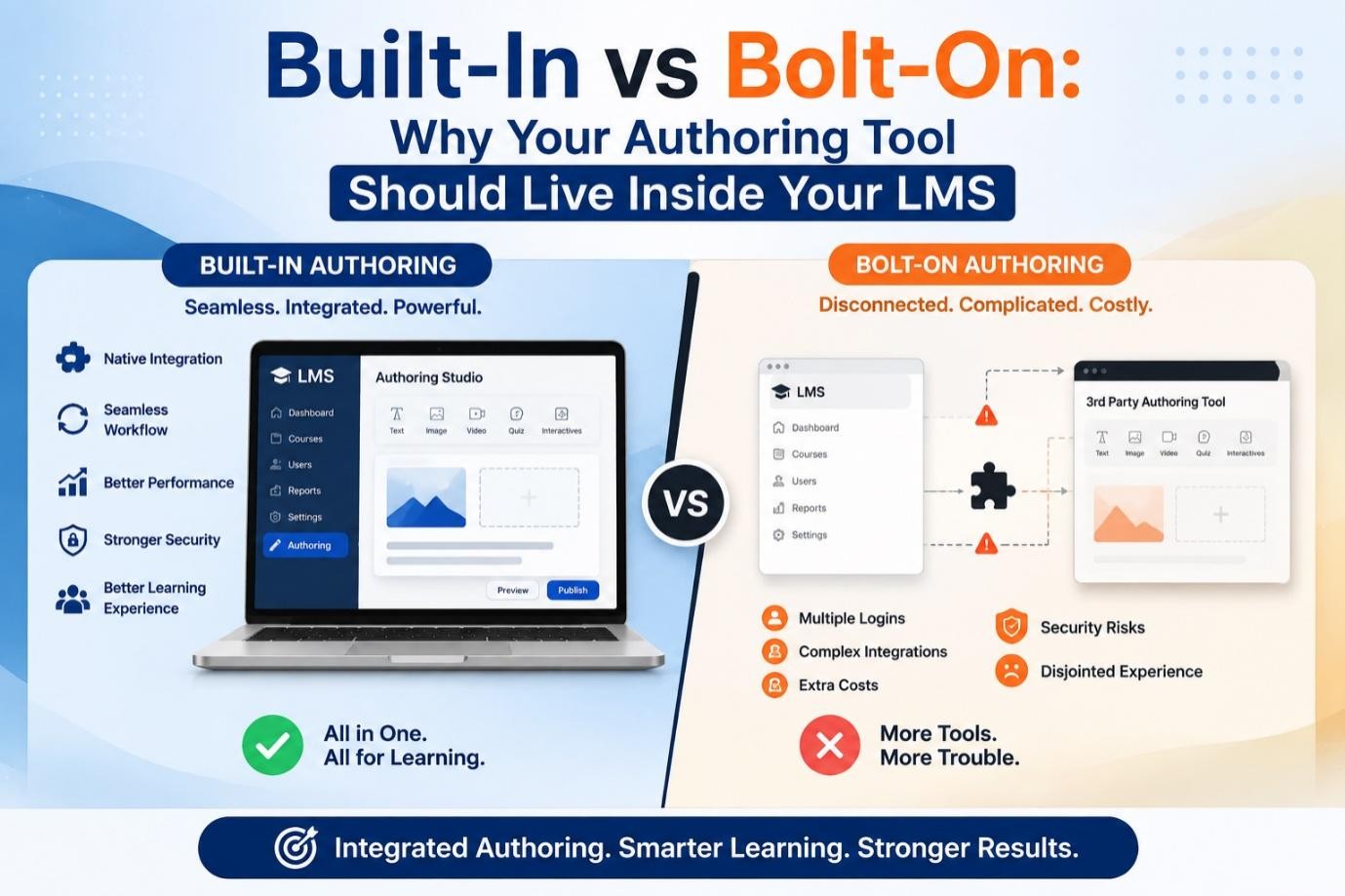
What is a Built-in Authoring Tool?
A built-in authoring tool means it is embedded in the LMS platform. Users, including instructors, other educators, and administrators, can use it to create and edit course content without leaving the LMS platform.
Depending on the specific system, it is possible to create:
It all works in one platform. Instructors will not have to create course content in one software and then export it somewhere else.
What is a Bolt-On Authoring Tool?
A bolt-on authoring tool is a stand-alone program that works with an LMS. Content developers create their material using the stand-alone software, and then upload or publish it on the LMS.
This system is appropriate when an organization has unique content-creation needs. The only problem that can arise with this method is that it can make the process a bit difficult.
For instance, a course developer may be required to,
When you repeat this process for many courses, it becomes very time-consuming.
Built-In vs Bolt-On: The Key Difference
The biggest difference is where the work happens. Under the bolt-on approach, course development and learning delivery happen in two separate environments. Under the native approach, they happen in the same environment.
This difference affects the content across all aspects, ranging from updates to collaboration.
| Feature | Built-In Authoring Tool | Bolt-On Authoring Tool |
|---|---|---|
| Course creation | Happens inside the LMS | Happens in a separate platform |
| Content transfer | Usually unnecessary | Often requires exporting and uploading |
| Updates | Can be made directly | May require re-exporting content |
| User experience | More connected | Can involve switching platforms |
| Data flow | Centralised | May depend on integrations |
| Administration | Simpler workflow | Multiple systems to manage |
A connected strategy will help reduce unnecessary complexities that may arise and allow learning teams to concentrate on content quality.
Why Your Authoring Tool Should Be Part of Your LMS
1. Rapid Course Development
An embedded authoring tool focuses on efficiency. Course developers can move from idea to published course without constantly switching between multiple programs. The course developer can construct lessons, insert material, design evaluations and structure learning modules all within the same interface.
This becomes highly useful when organizations need to react quickly to:
An AI first LMS solution can further improve efficiency by helping create courses, learning materials, summaries, and assessments.
2. Fewer Integration Challenges
Every new software solution adds another technological element. Outside the LMS, authoring systems may have integrations, compatibility testing, user rights, and regular upgrades. An integrated authoring system will reduce the number of pieces.
It does not mean companies must avoid external software solutions. It implies that they should assess the need for such solutions in the first place.
For businesses that use various learning technologies, seamless LMS integration for existing systems still matters. It can also help avoid overly complicated processes for routine content creation.
3. Stronger Connection Between Content and Data
An LMS platform can gather useful data on learner activity. An organization may need to know:
If there is no connection between an authoring tool and an LMS, it is difficult to link content updates to learner performance. This solution makes this relationship closer. The author of courses can utilize the information about learner behavior to develop further versions of his content.
For instance, if learners consistently struggle with a specific assessment question, the author can improve the explanation in the relevant lesson.
4. Reduced Administrative Work
Learning administrators are already responsible for many functions. Multiple platforms can add complexity around user access and maintenance.
The built-in writing capacity might help ease this strain by keeping all vital operations in one place. Administrators can focus only on learners and learning programs.
It can prove useful for those educational institutions that require easy LMS integration for institutions while ensuring smooth content creation.
5. More Consistent User Experience
Having course development and reporting in one environment ensures a more consistent user experience for everyone. Administrators can work in the tools they know.
Instructors do not have to master multiple user interfaces to perform standard functions. Learners get to access course material from one location.
A consistent LMS also enables consistent branding and course structure across different learning programs. This matter because complex programs can hinder the development and management of learning materials.
Which One to Choose?
Prior to picking your authoring solution, think about the following questions,
These questions might help you decide whether an embedded solution will streamline your learning process.
Conclusion
Opting for an integrated authoring tool makes course creation easier, reduces paperwork, and ensures a seamless learning process. Instead of using different systems, you can develop, deliver, and enhance your training from one centralized system.
Ready to change the way you learn and manage your learning content? Get started with InstructoHub and enjoy modern learning. With its AI-powered LMS features, InstructoHub lets you create engaging courses and manage learner performance effortlessly.
FAQs
About the Author:
Ankit Garg is an EdTech and eLearning professional with nearly 20 years of experience in learning technology, LMS solutions, and corporate learning. At InstructoHub, he focuses on AI-powered LMS solutions, integrated course creation, and learning automation. His expertise in LMS integrations and AI-driven authoring helps educators and organisations simplify content creation by bringing authoring tools directly into the learning platform, reducing manual work and creating a more connected, efficient learning experience.